🔒 100% Offline • Your Data Stays Private

Track Subscriptions.
Keep Your Privacy.

The only subscription tracker that never shares your data. No bank connections, no cloud storage, no compromises.

Download for Windows Free • Windows 10/11 • No account required
10,000+ Downloads
$240 Avg. Yearly Savings
4.8★ User Rating
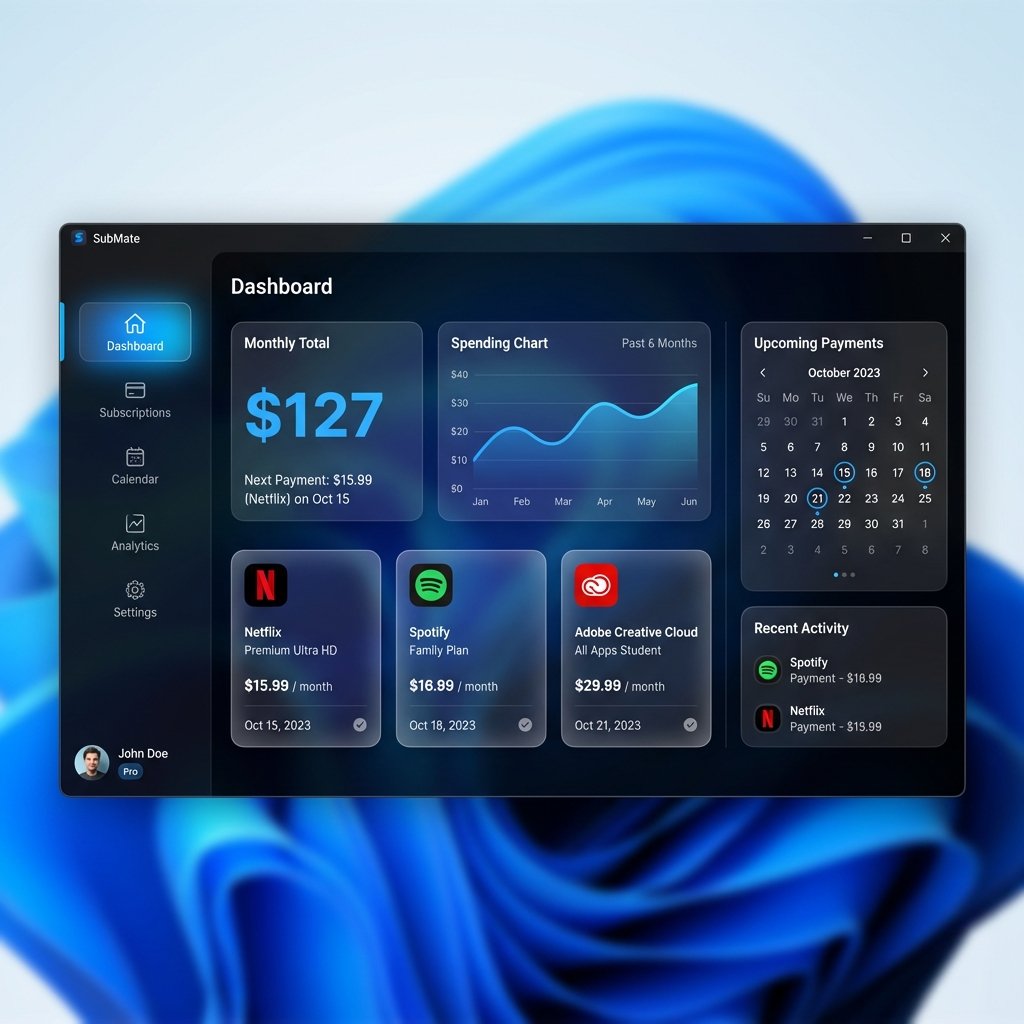
SubScriptor Dashboard - Subscription Tracker Interface
💸

Hidden Subscriptions

The average person pays for 12+ subscriptions but uses only 8. That's $50+/month wasted.

🏦

Bank Integration Risks

Most trackers require access to your bank accounts. One breach = all your financial data exposed.

☁️

Cloud Vulnerabilities

Web apps store your financial data on their servers. You're trusting them with your privacy.

There's a better way.

SubScriptor gives you complete visibility into your subscriptions — without compromising your privacy.

Everything You Need to Take Control

Powerful features that respect your privacy

📊

Visual Dashboard

See all subscriptions at a glance. Monthly costs, annual totals, spending by category.

📅

Payment Calendar

Never miss a renewal date. Visual calendar shows upcoming payments.

👥

Team Management

Track subscriptions for your whole family or business team.

📁

CSV Import

Import data from any source. No proprietary formats or lock-in.

💾

Local Database

SQLite database stored on your PC. Export or delete anytime.

🤖 AI-Powered Analysis

Find Hidden Subscriptions in Seconds

Upload your bank statement PDF and our AI will automatically detect every recurring payment — even the ones you forgot about.

  • PDF Upload — Import statements from any bank
  • Smart Detection — AI recognizes subscription patterns
  • Duplicate Finder — Identifies overlapping services
  • Privacy First — Statement processed, never stored
Try AI Analysis
AI Analysis Results
📺 Netflix Premium $22.99/mo
🎵 Spotify Family $16.99/mo
☁️ iCloud+ (Duplicate?) $2.99/mo
🏋️ Fitness App (Unused 6mo) $9.99/mo
Potential Savings $12.98/mo
🔐 Privacy First

Your Data Never Leaves Your Computer

Unlike cloud-based trackers, SubScriptor stores everything locally. We can't see your data because we never have it.

  • No Bank Connections — We never ask for your bank login
  • No Cloud Storage — Data lives on your PC, not our servers
  • No Account Required — Download and use immediately
  • Optional AI — AI analysis only when you explicitly choose
  • Full Export — Your data, your format, anytime
💻
Your PC
Data stays here
☁️
Cloud Servers
No access

Start Saving in 3 Minutes

No signup, no learning curve

1

Download & Install

One-click installer for Windows. No account needed.

2

Add Subscriptions

Enter manually or import from CSV/bank statement.

3

See Your Savings

Dashboard shows where you can cut costs.

Simple, Transparent Pricing

Start free, upgrade when you need more

Free

$0
forever
  • ✓ Unlimited subscriptions
  • ✓ Dashboard & calendar
  • ✓ CSV import/export
  • ✓ Local data storage
  • ✓ Categories & tags
  • ✗ AI statement analysis
  • ✗ Team management
Download Free

Business

$49
per year
  • ✓ Everything in Starter
  • ✓ Team management
  • ✓ Multi-owner support
  • ✓ Client tracking
  • ✓ Business reports
  • ✓ Priority support
Get Business

Loved by Privacy-Conscious Users

"Finally, a subscription tracker that doesn't want my bank login. Found $80/month in forgotten subscriptions."

Sarah M. Freelance Designer

"As a security professional, I appreciate that my data stays local. Clean interface, does exactly what it promises."

Michael K. IT Security Analyst

"The AI feature found subscriptions in my bank statement I completely forgot about. Cancelled 3 immediately."

David L. Small Business Owner

Frequently Asked Questions

Is SubScriptor really free?

Yes! The core features are completely free forever. AI analysis and team features require a paid license.

Do you store my data on your servers?

No. All your data is stored locally on your computer in a SQLite database. We never see or access your data.

Do I need to connect my bank account?

No. SubScriptor never asks for bank access. You add subscriptions manually or import from CSV/bank statements.

How does AI analysis work?

You can optionally paste your bank statement text. Our AI analyzes it to find recurring payments. The statement is processed and not stored.

Can I export my data?

Yes. Export all your data to CSV anytime. The SQLite database file is also directly accessible on your PC.

Does it work offline?

Yes! All core features work completely offline. Only AI analysis requires internet connection.

Ready to Take Control?

Download SubScriptor and start tracking your subscriptions privately.

Download for Windows
Version 1.0.0 Windows 10/11 16 MB